Excel 模板转 ROS 模板
命令
使用以下命令可将 Excel 模板转换为 ROS 模板,并在当前目录生成N个模板文件:
rostran transform templates/excel/EcsInstance.xlsx --target-path tests/template.json
Excel 模板语法
Excel 模板仅支持 1 个 Sheet,其中:
- 第 1 列为资源类型或属性。
- 从第 2 列开始,每一列代表一个模板,对应的每一行为资源的属性值。
参数和资源声明
在第 1 列中,可按行填写资源类型及其属性,分为两个区块:
-
[选填]
ROS::Parameters表示生成到 ROS 模板中的参数,可以在属性值单元格中通过!Ref来引用。 在 Sheet 中声明此区块后,接下来的每一行单元格可声明参数,直至遇到下一个区块声明。 -
[必填]
ROS::Resources表示生成到 ROS 模板中的资源。 在 Sheet 中声明此区块后,可在后面的行单元格中声明资源类型, 然后再下面的 N 行中声明此资源的 N 个属性。可如此往复声明多个资源。
注释
- 单元格以
#开始注释整行内容。 - 如果单元格已经声明了区块,在此单元格中换行的内容也被视作注释。
原始 Excel 模板
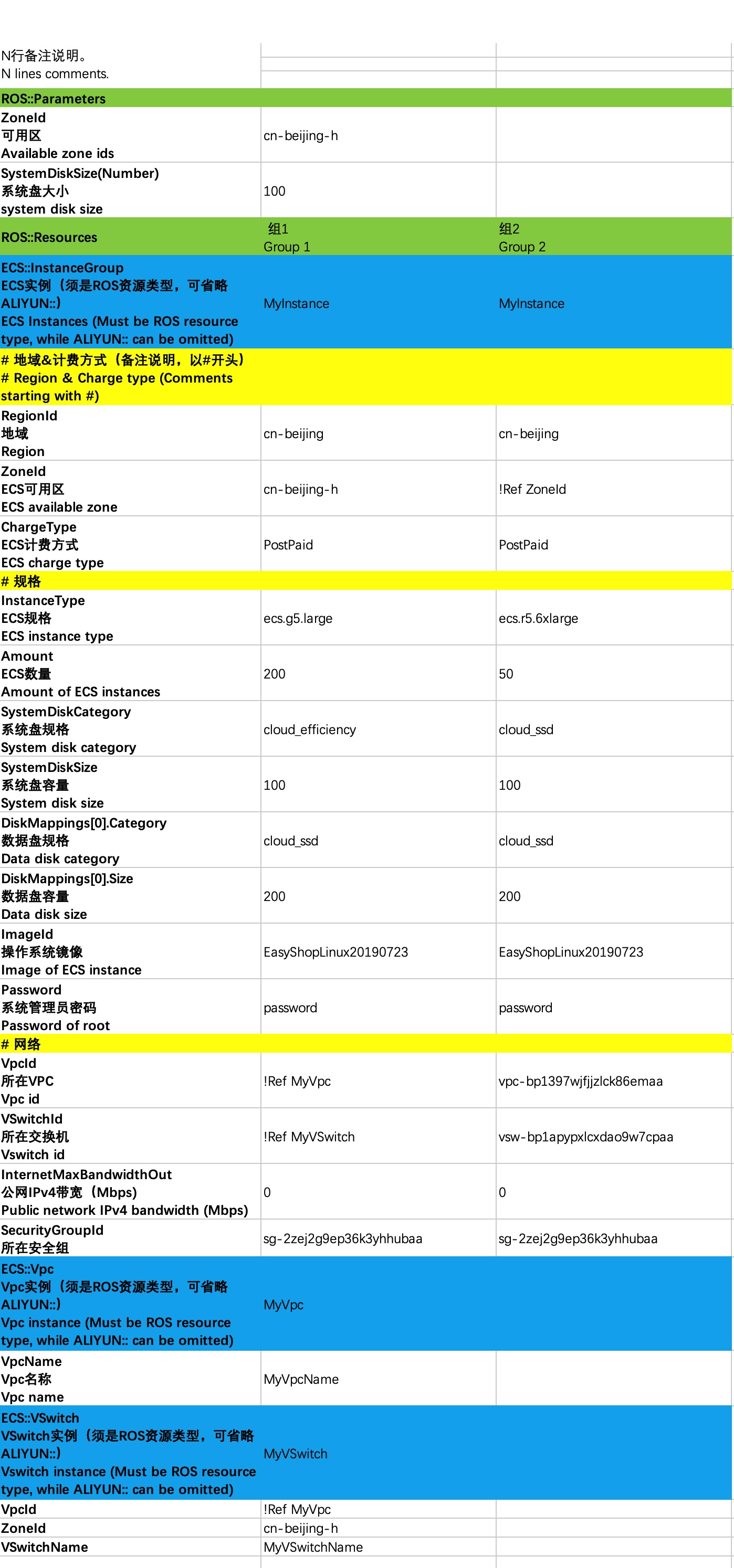
转换后的 ROS 模板
- template-0.json
{
  "ROSTemplateFormatVersion": "2015-09-01",
  "Parameters": {
    "ZoneId": {
      "Type": "String",
      "Default": "cn-beijing-h"
    },
    "SystemDiskSize": {
      "Type": "Number",
      "Default": 100
    }
  },
  "Resources": {
    "MyInstance": {
      "Type": "ALIYUN::ECS::InstanceGroup",
      "Properties": {
        "RegionId": "cn-beijing",
        "ZoneId": "cn-beijing-h",
        "ChargeType": "PostPaid",
        "InstanceType": "ecs.g5.large",
        "Amount": 200,
        "SystemDiskCategory": "cloud_efficiency",
        "SystemDiskSize": 100,
        "DiskMappings": [
          {
            "Category": "cloud_ssd",
            "Size": 200
          }
        ],
        "ImageId": "EasyShopLinux20190723",
        "Password": "password",
        "VpcId": {
          "Ref": "MyVpc"
        },
        "VSwitchId": {
          "Ref": "MyVSwitch"
        },
        "InternetMaxBandwidthOut": 0,
        "SecurityGroupId": "sg-2zej2g9ep36k3yhhubaa"
      }
    },
    "MyVpc": {
      "Type": "ALIYUN::ECS::Vpc",
      "Properties": {
        "VpcName": "MyVpcName"
      }
    },
    "MyVSwitch": {
      "Type": "ALIYUN::ECS::VSwitch",
      "Properties": {
        "VpcId": {
          "Ref": "MyVpc"
        },
        "ZoneId": "cn-beijing-h",
        "VSwitchName": "MyVSwitchName"
      }
    }
  }
}
- template-1.json
{
  "ROSTemplateFormatVersion": "2015-09-01",
  "Parameters": {
    "ZoneId": {
      "Type": "String"
    },
    "SystemDiskSize": {
      "Type": "Number"
    }
  },
  "Resources": {
    "MyInstance": {
      "Type": "ALIYUN::ECS::InstanceGroup",
      "Properties": {
        "RegionId": "cn-beijing",
        "ZoneId": {
          "Ref": "ZoneId"
        },
        "ChargeType": "PostPaid",
        "InstanceType": "ecs.r5.6xlarge",
        "Amount": 50,
        "SystemDiskCategory": "cloud_ssd",
        "SystemDiskSize": 100,
        "DiskMappings": [
          {
            "Category": "cloud_ssd",
            "Size": 200
          }
        ],
        "ImageId": "EasyShopLinux20190723",
        "Password": "password",
        "VpcId": "vpc-bp1397wjfjjzlck86emaa",
        "VSwitchId": "vsw-bp1apypxlcxdao9w7cpaa",
        "InternetMaxBandwidthOut": 0,
        "SecurityGroupId": "sg-2zej2g9ep36k3yhhubaa"
      }
    }
  }
}