Transform Excel Template to ROS Template
Command
Use the following command to transform Excel template into ROS template and generate template file(s) in the current directory:
rostran transform templates/excel/EcsInstance.xlsx.md --target-path tests/template.json
Excel Template Grammar
The Excel template only supports 1 Sheet, of which:
- The first column is the resource type or attribute.
- Starting from the second column, each column represents a template, and each row corresponds to the attribute value of the resource.
Parameter and resource declaration
In the first column, you can fill in the resource type and its attributes by row, divided into two blocks:
-
[Optional]
ROS::Parametersmeans the parameters generated in the ROS template, which can be referenced by!Refin the attribute value cell. After this block is declared in the Sheet, parameters can be declared in each row of cells until the next block declaration is encountered. -
[Required]
ROS::Resourcesrepresents the resources generated in the ROS template. After declaring this block in Sheet, you can declare resource type in the following row cell, Then declare the N attributes of this resource in the following N lines. Multiple resources can be declared back and forth in this way.
Comment
- Cells start with
#to comment the entire line. - If the cell has declared a block, the content wrapped in this cell is also regarded as a comment.
Original Excel Template
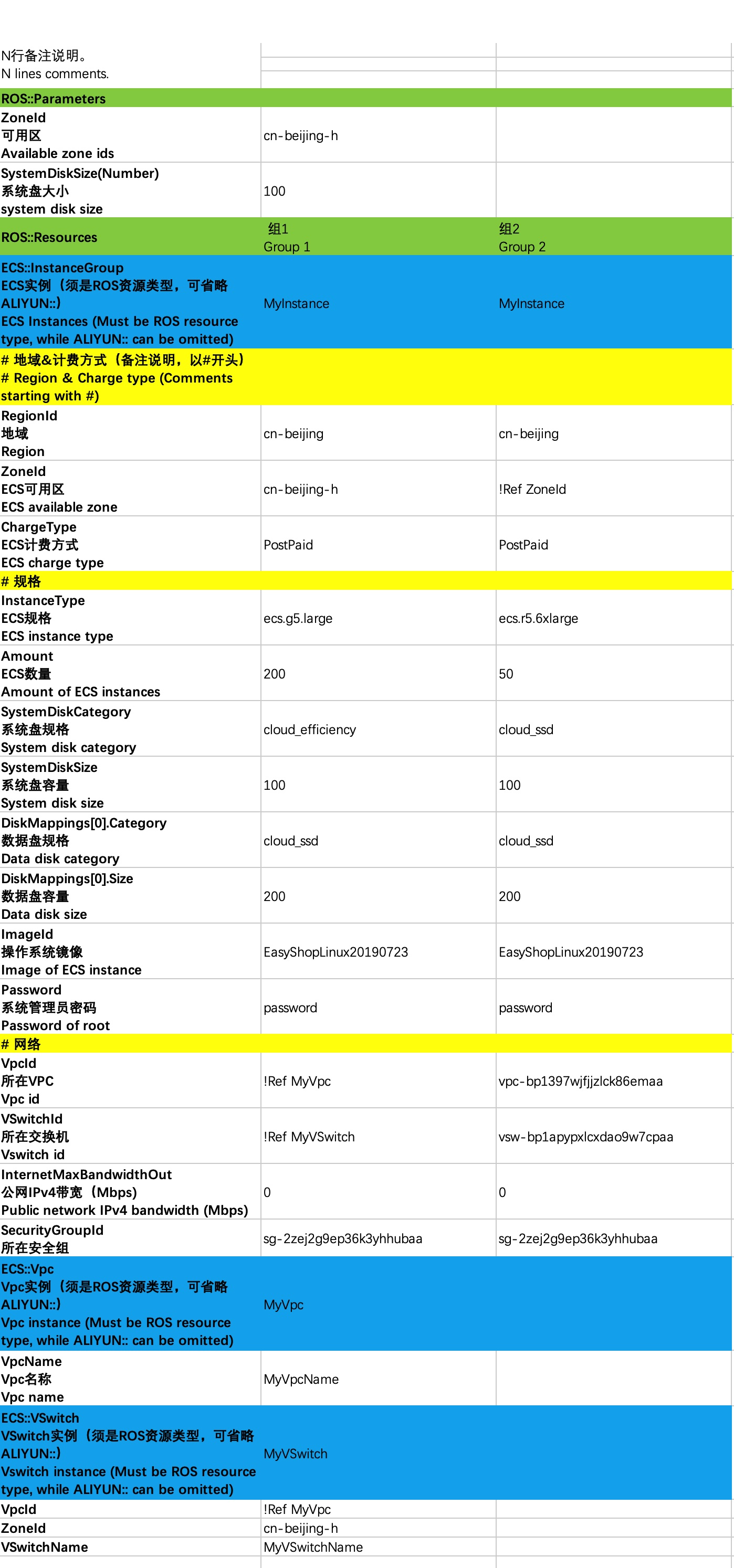
Transformed ROS Template
- template-0.json
{
  "ROSTemplateFormatVersion": "2015-09-01",
  "Parameters": {
    "ZoneId": {
      "Type": "String",
      "Default": "cn-beijing-h"
    },
    "SystemDiskSize": {
      "Type": "Number",
      "Default": 100
    }
  },
  "Resources": {
    "MyInstance": {
      "Type": "ALIYUN::ECS::InstanceGroup",
      "Properties": {
        "RegionId": "cn-beijing",
        "ZoneId": "cn-beijing-h",
        "ChargeType": "PostPaid",
        "InstanceType": "ecs.g5.large",
        "Amount": 200,
        "SystemDiskCategory": "cloud_efficiency",
        "SystemDiskSize": 100,
        "DiskMappings": [
          {
            "Category": "cloud_ssd",
            "Size": 200
          }
        ],
        "ImageId": "EasyShopLinux20190723",
        "Password": "password",
        "VpcId": {
          "Ref": "MyVpc"
        },
        "VSwitchId": {
          "Ref": "MyVSwitch"
        },
        "InternetMaxBandwidthOut": 0,
        "SecurityGroupId": "sg-2zej2g9ep36k3yhhubaa"
      }
    },
    "MyVpc": {
      "Type": "ALIYUN::ECS::Vpc",
      "Properties": {
        "VpcName": "MyVpcName"
      }
    },
    "MyVSwitch": {
      "Type": "ALIYUN::ECS::VSwitch",
      "Properties": {
        "VpcId": {
          "Ref": "MyVpc"
        },
        "ZoneId": "cn-beijing-h",
        "VSwitchName": "MyVSwitchName"
      }
    }
  }
}
- template-1.json
{
  "ROSTemplateFormatVersion": "2015-09-01",
  "Parameters": {
    "ZoneId": {
      "Type": "String"
    },
    "SystemDiskSize": {
      "Type": "Number"
    }
  },
  "Resources": {
    "MyInstance": {
      "Type": "ALIYUN::ECS::InstanceGroup",
      "Properties": {
        "RegionId": "cn-beijing",
        "ZoneId": {
          "Ref": "ZoneId"
        },
        "ChargeType": "PostPaid",
        "InstanceType": "ecs.r5.6xlarge",
        "Amount": 50,
        "SystemDiskCategory": "cloud_ssd",
        "SystemDiskSize": 100,
        "DiskMappings": [
          {
            "Category": "cloud_ssd",
            "Size": 200
          }
        ],
        "ImageId": "EasyShopLinux20190723",
        "Password": "password",
        "VpcId": "vpc-bp1397wjfjjzlck86emaa",
        "VSwitchId": "vsw-bp1apypxlcxdao9w7cpaa",
        "InternetMaxBandwidthOut": 0,
        "SecurityGroupId": "sg-2zej2g9ep36k3yhhubaa"
      }
    }
  }
}